Simple Data Analysis - v6.0.13
Simple data analysis (SDA)
SDA is a fast and easy-to-use TypeScript library for tabular, geospatial, vector, and AI-assisted data analysis. It runs on Node.js and makes it easy to load data from files, databases, and public sources.
Learn how to use SDA with Code Like a Journalist, a free and open-source TypeScript course for data analysis and visualization.
SDA is maintained by Nael Shiab, computational journalist and senior data producer for CBC News. You might also find the journalism library useful. Contributions are welcome; see the contribution guidelines.
Table of contents
Library structure
SDA is split into two packages:
-
simple-data-analysis-corecontains all core functions that depend on DuckDB (data loading, filtering, joining, summarizing, geospatial operations, etc.). If you only need these core data analysis capabilities, you can use this lighter package directly. -
simple-data-analysis(this package) extends the core with additional features: AI methods (row-by-row processing, embeddings, vector similarity, hybrid search, RAG, natural language queries), Google Cloud Storage and Google Sheets integrations, and charting/dataviz methods. These features are built respectively on thejournalism-ai,journalism-google, andjournalism-datavizlibraries.
Most users will want this package (simple-data-analysis), which includes all
of the core functionality plus the extended features.
AI, Google, and charting dependencies load only when those operations run. If you only use core methods, you don't pay their startup cost.
The documentation includes
all inherited Core methods. For AI assistants, use llm.md or
llms.txt.
Installation
The library is available on npm.
npm i @nshiab/simple-data-analysis
To start a new data project with essential folders, configurations, and documentation for AI agents, you can use @nshiab/setup-data-project.
npx @nshiab/setup-data-project
Performance
SDA uses DuckDB to handle large tabular and geospatial analyses efficiently, often outperforming traditional dataframe tools while keeping the code simple and readable.
These benchmarks were run on a MacBook Pro with an Apple M4 Max and 64 GB of memory.
Tabular data
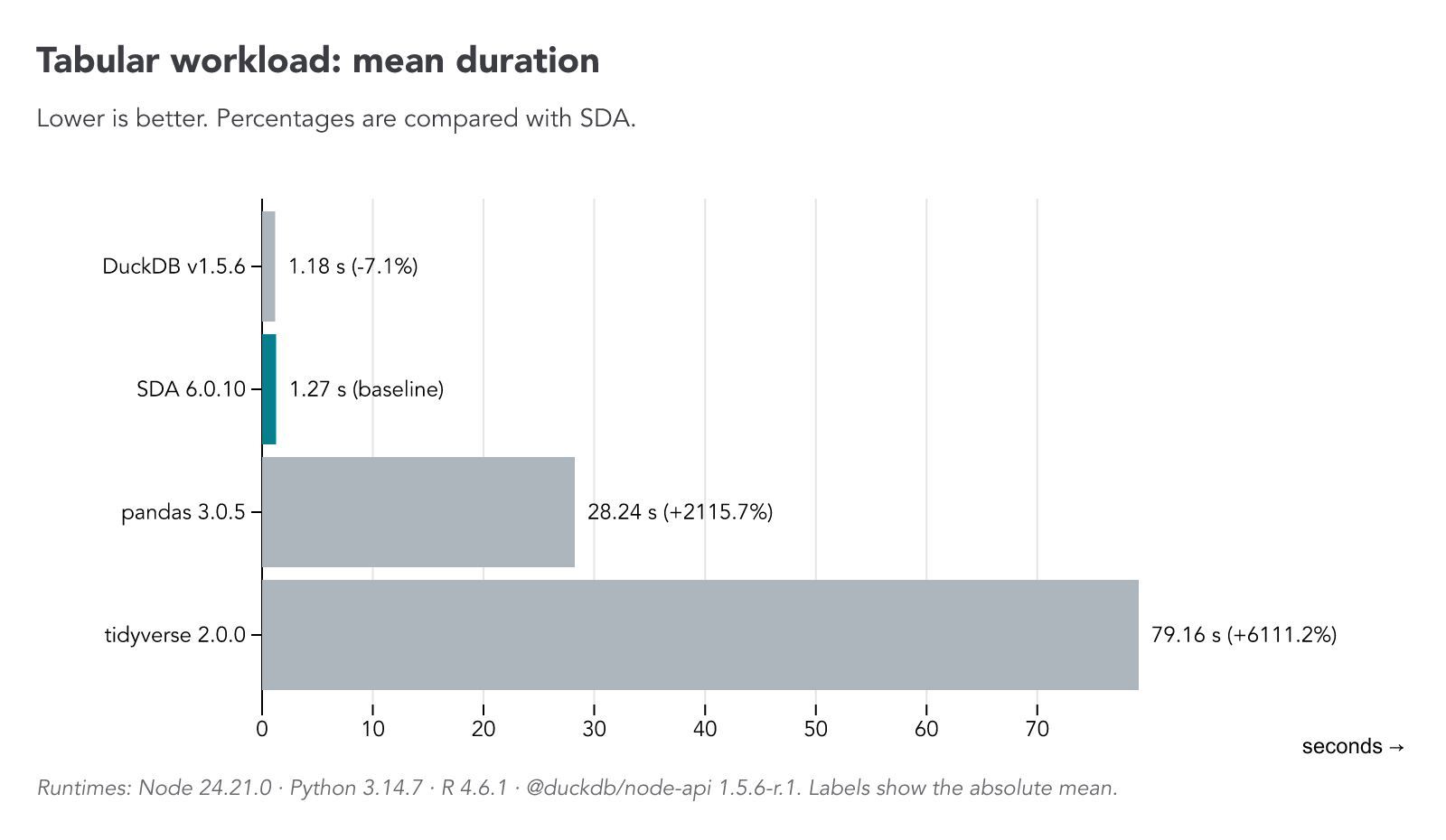
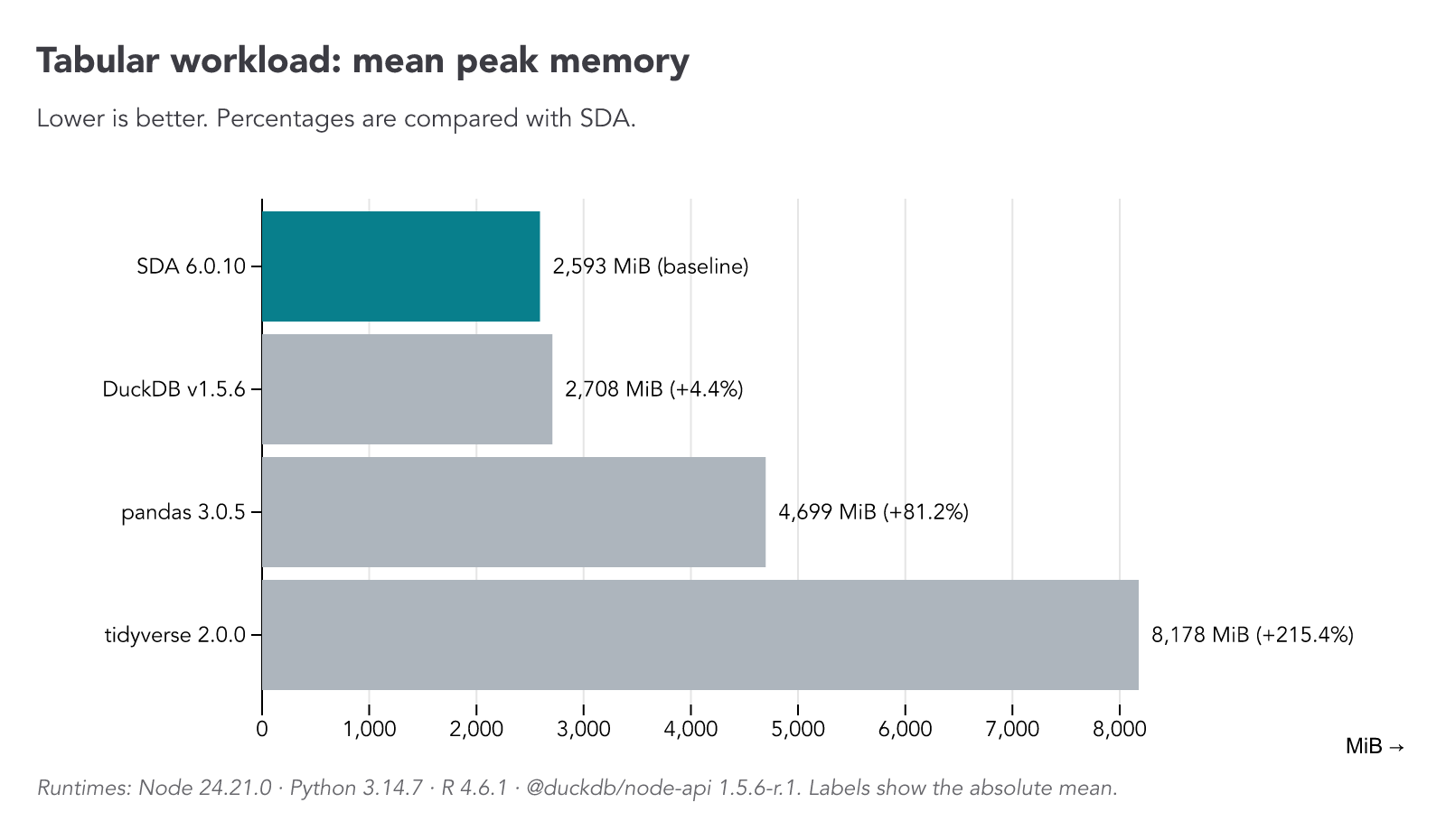
Using 22,051,025 temperature records (ahccd.csv, 1.77 GB, in
benchmarks/data/), we remove missing temperatures, convert dates and numbers,
save the cleaned data, then calculate average temperatures by station and decade
and export the sorted results.
We ran the same analysis with SDA, pandas, the tidyverse, and raw DuckDB. SDA stays close to raw DuckDB while keeping the code simple and readable.
Geospatial data
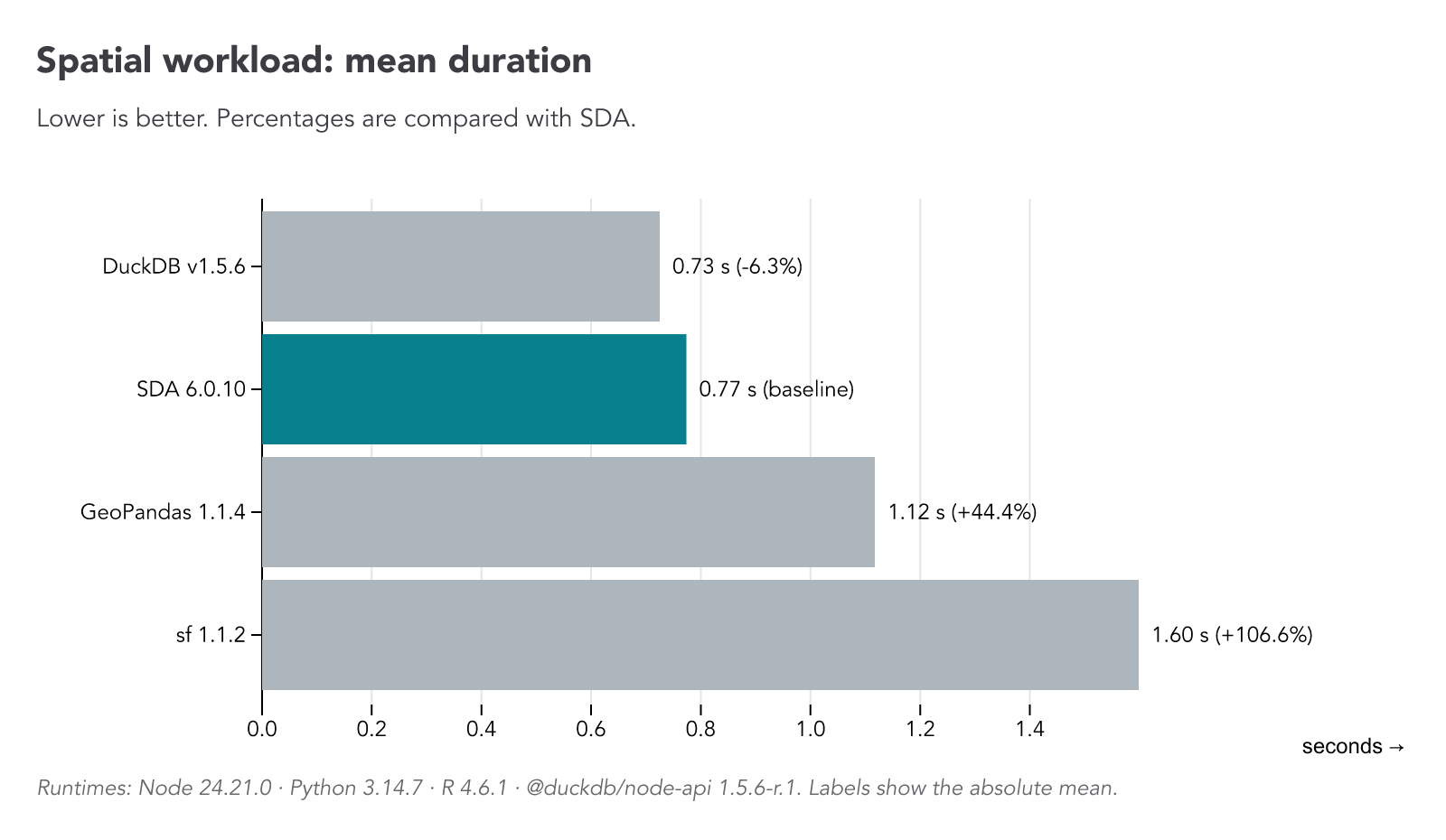
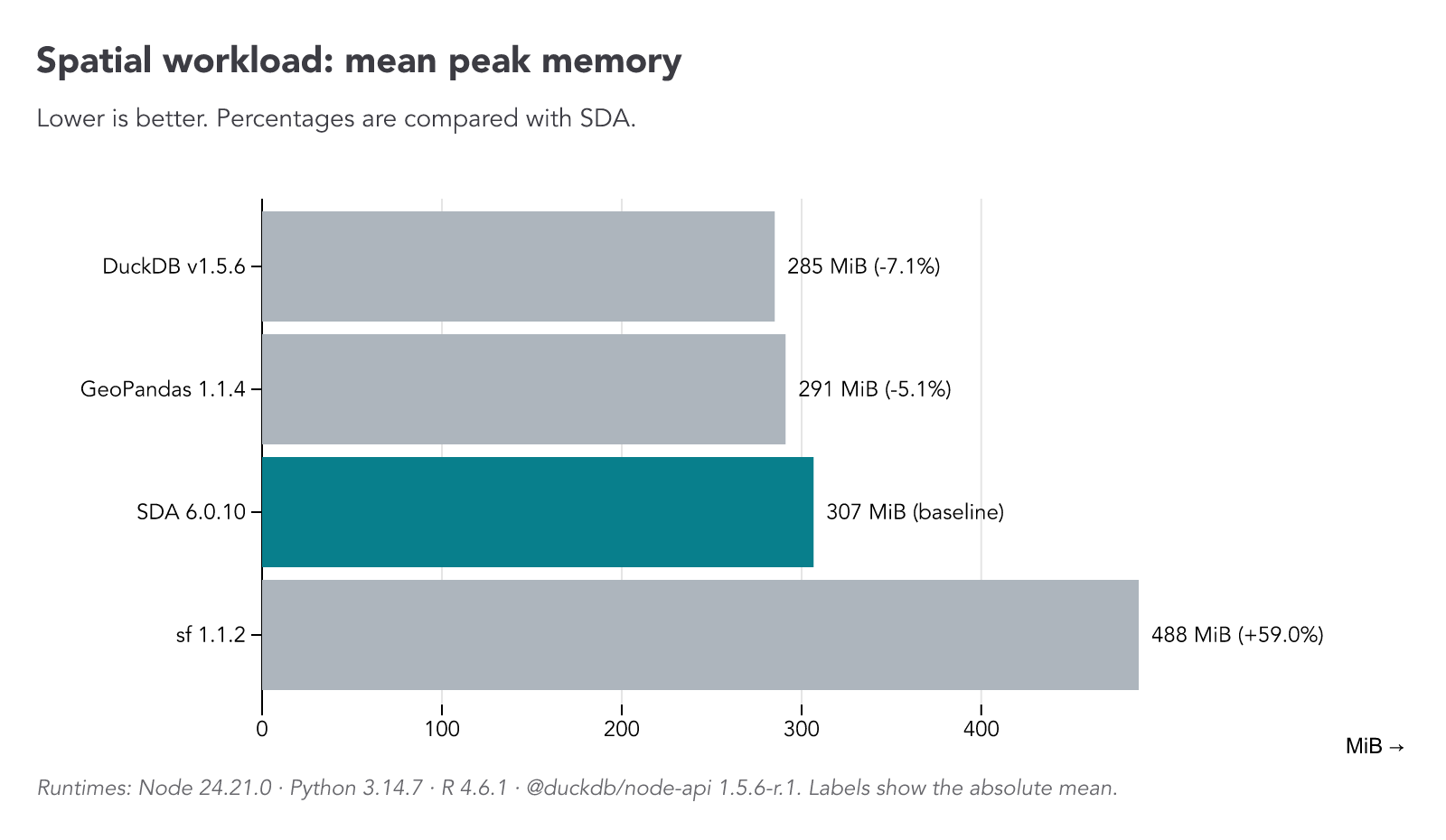
Using 335,024 Montreal public trees (arbres-publics.csv, 135.5 MB) and 91
neighbourhood boundaries (quartierreferencehabitation.geojson, 1.14 MB), both
in benchmarks/data/, we remove missing coordinates, create points, join trees
to neighbourhoods, then count trees per neighbourhood and export the sorted
results.
We ran the same analysis with SDA, GeoPandas, sf, and raw DuckDB. SDA brings DuckDB's geospatial tools to the same simple, chainable API.
Core principles
SDA is born out of the frustration of switching between Python, R, and JavaScript to produce data journalism projects. Usually, data crunching and analysis are done with Python or R, and interactive data visualizations are coded in JavaScript. However, being proficient in multiple programming languages is hard. Why can't we do everything in JS?
The missing piece in the JavaScript/TypeScript ecosystem was an easy-to-use and performant library for data analysis. This is why SDA was created.
The library is based on DuckDB, a fast in-process analytical database. Under the hood, SDA executes SQL queries in DuckDB through duckdb-node-neo. SDA also uses DuckDB extensions for additional capabilities, including duckdb_spatial for geospatial computations and other extensions for fuzzy matching, full-text search, vector indexes, and more. These extensions are loaded lazily, only when the corresponding features are used.
To keep data pipelines concise and fast, SDA queues core transformations instead
of executing each one immediately. Consecutive compatible operations are fused
into a single DuckDB statement, reducing database round trips. Transformation
methods are synchronous and chainable; async observer methods such as
getData(), log(), and writeData() flush the queue before producing their
result. This means only the final observer needs to be awaited.
Export and chart observers (toSheet(), toDatawrapper(),
toGeoDatawrapper(), writeChart(), writeMap(), logLineChart(),
logDotChart(), logBarChart(), and logHistogram()) remain asynchronous and
return Promise<this>, like writeData(). Await the operation to get the same
table back, preserving its subclass type:
const table = await sdb.newTable().loadGeoData("regions.geojson").writeMap(map, "output/map.svg");
await table.filter("population > 100000").log();
aiRAG() and toBucket() remain asynchronous and return an answer or upload
URI.
The syntax and the available methods were inspired by Pandas (Python) and the Tidyverse (R). Method and option names are kept simple and descriptive, so anyone can read an SDA pipeline and understand what is happening step by step.
Examples
Tabular data
In this example, we load daily temperatures for three Canadian weather stations, remove missing values, and compute the average temperature for each station. We then log the results and write them to a CSV file.
import { SimpleDB } from "@nshiab/simple-data-analysis";
const sdb = new SimpleDB();
const data = await sdb
.newTable("temperatures")
.loadData(
"https://raw.githubusercontent.com/nshiab/simple-data-analysis/main/test/data/files/dailyTemperatures.csv",
)
.renameColumns({ t: "temperature", id: "station" })
.removeMissing({ columns: "temperature" })
.summarize({
columns: "temperature",
by: "station",
stats: "mean",
decimals: 2,
})
.sort({ mean: "desc" })
.log();
await data.writeData("sda/output/averageTemperatures.csv");
await sdb.close();
Geospatial data
In this example, we load a CSV file with the latitude and longitude of 2023 wildfires in Canada, create point geometries from it, do a spatial join with provinces' boundaries, write the joined data to a GeoJSON file, and then compute the number of fires and the total area burnt per province.
import { SimpleDB } from "@nshiab/simple-data-analysis";
const sdb = new SimpleDB();
const fires = await sdb
.newTable("fires")
.loadData(
"https://raw.githubusercontent.com/nshiab/simple-data-analysis/main/test/geodata/files/firesCanada2023.csv",
)
.createPoints("lat", "lon", "geom")
.log();
const provinces = await sdb
.newTable("provinces")
.loadGeoData(
"https://raw.githubusercontent.com/nshiab/simple-data-analysis/main/test/geodata/files/CanadianProvincesAndTerritories.json",
)
.log();
// Join fires with provinces so each fire has its province's attributes attached.
const firesInsideProvinces = await fires
.joinGeo(provinces, "inside", {
outputTable: "firesInsideProvinces",
})
.removeMissing()
.removeColumns("geomProvinces")
.log();
// Write the joined, detailed fire data to a GeoJSON file.
await firesInsideProvinces.writeGeoData("sda/output/firesInsideProvinces.geojson");
// Count the fires and sum the burnt area per province.
await firesInsideProvinces
.summarize({
columns: "hectares",
by: "nameEnglish",
stats: { nbFires: "count", burntArea: "sum" },
decimals: 0,
})
.sort({ burntArea: "desc" })
.log();
await sdb.close();
Data visualisations
Charts
You can easily display charts directly in the terminal with the
logBarChart,
logDotChart,
logLineChart
and
logHistogram
methods.
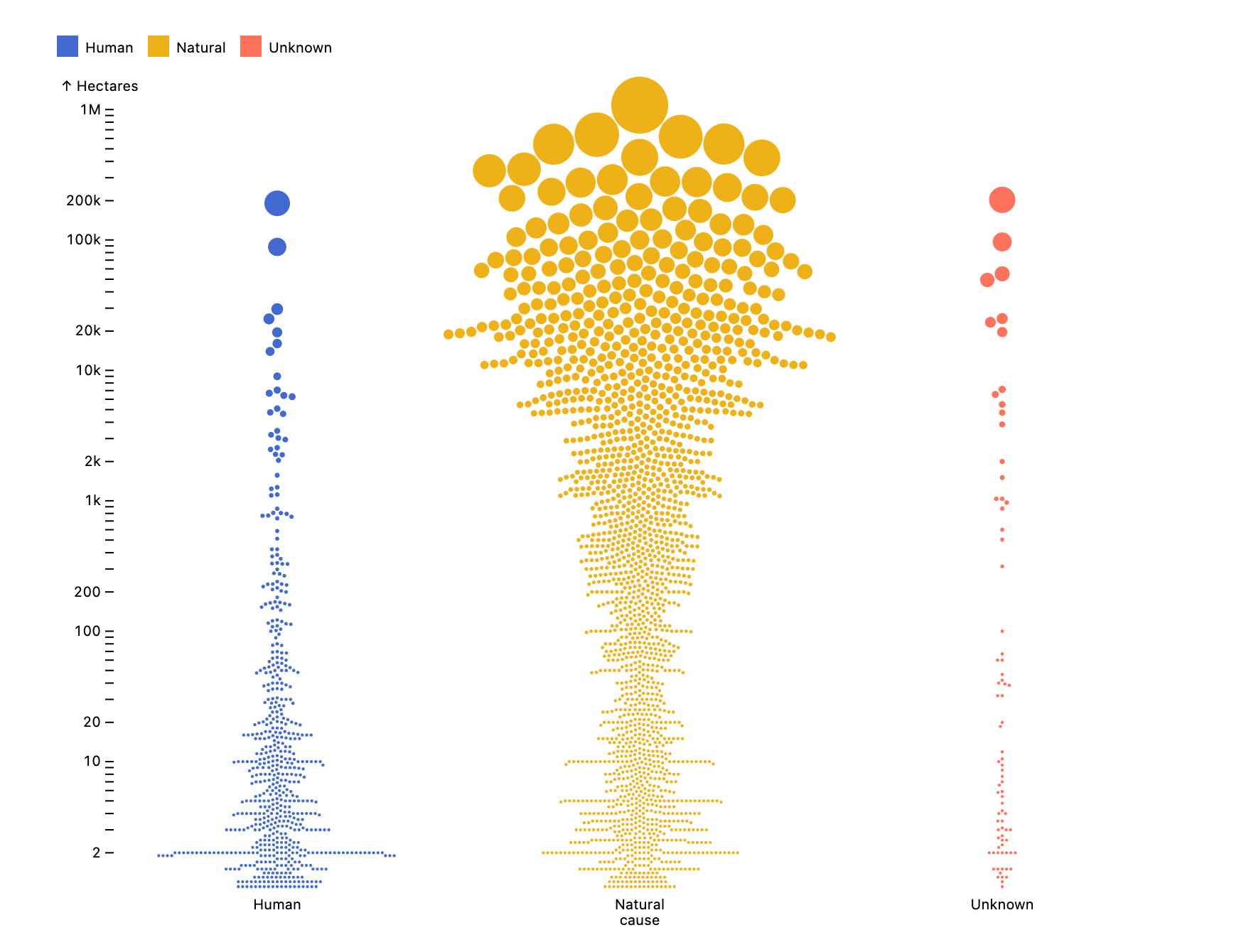
But you can also create Observable Plot
charts as an image file (.png or .svg) with
writeChart.
Here's an example.
import { SimpleDB } from "@nshiab/simple-data-analysis";
import { dodgeX, dot, plot } from "@observablehq/plot";
const sdb = new SimpleDB();
const table = await sdb
.newTable()
.loadData(
"https://raw.githubusercontent.com/nshiab/simple-data-analysis/main/test/geodata/files/firesCanada2023.csv",
)
.filter(`hectares > 1`)
.replace("cause", { H: "Human", N: "Natural", U: "Unknown" })
.log();
// We create a beeswarm chart with a log scale, faceted by cause.
await table.writeChart(
(data) =>
plot({
height: 600,
width: 800,
color: { legend: true },
y: { type: "log", label: "Hectares" },
r: { range: [1, 20] },
marks: [
dot(
data,
dodgeX("middle", {
fx: "cause",
y: "hectares",
fill: "cause",
r: "hectares",
}),
),
],
}),
"sda/output/chart.png",
);
await sdb.close();
Maps
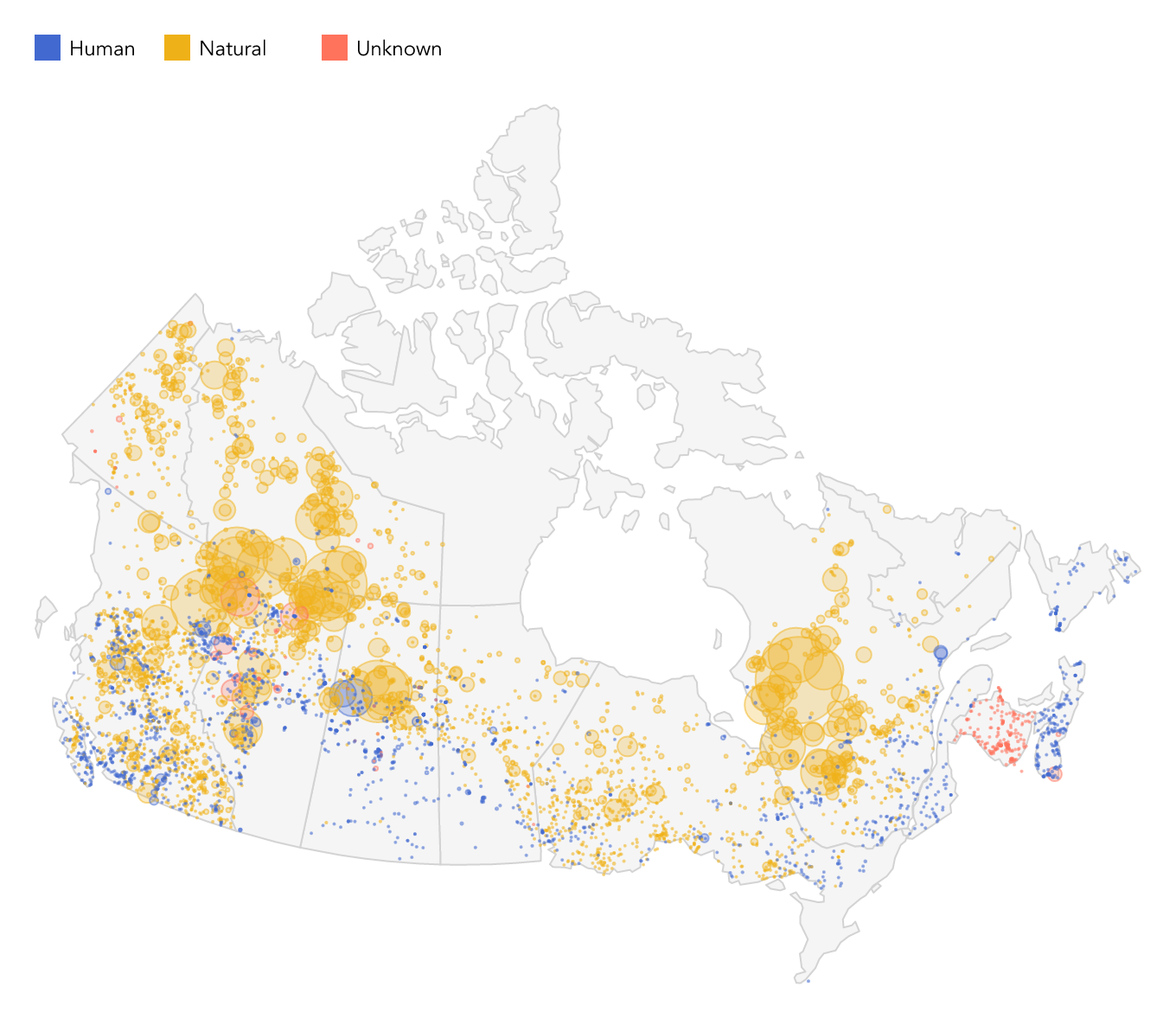
If you want to create Observable Plot
maps, you can use
writeMap.
Here's an example.
import { SimpleDB } from "@nshiab/simple-data-analysis";
import { geo, plot } from "@observablehq/plot";
const sdb = new SimpleDB();
const fires = await sdb
.newTable("fires")
.loadData(
"https://raw.githubusercontent.com/nshiab/simple-data-analysis/main/test/geodata/files/firesCanada2023.csv",
)
.createPoints("lat", "lon", "geom")
.replace("cause", { H: "Human", N: "Natural", U: "Unknown" })
.selectColumns(["geom", "hectares", "cause"])
.filter(`hectares > 0`)
.log();
const provinces = await sdb
.newTable("provinces")
.loadGeoData(
"https://raw.githubusercontent.com/nshiab/simple-data-analysis/main/test/geodata/files/CanadianProvincesAndTerritories.json",
)
.log();
// Create a map covering all provinces and territories.
await provinces.writeMap(
// Province polygons are provided as GeoJSON, already rewound for D3.
async (provinces) => {
return plot({
projection: {
type: "conic-conformal",
rotate: [100, -60],
domain: provinces,
},
color: {
legend: true,
},
r: { range: [0.5, 25] },
marks: [
geo(provinces, {
stroke: "lightgray",
fill: "whitesmoke",
}),
// Retrieve the fire locations as GeoJSON for the second layer.
geo(await fires.getGeoData(), {
r: "hectares",
fill: "cause",
fillOpacity: 0.25,
stroke: "cause",
strokeOpacity: 0.5,
}),
],
});
},
"sda/output/map.png",
);
await sdb.close();
Public data sources
SDA can download data directly from established public sources. Retrieved data is cached locally by default, making it easy to build reproducible workflows without repeatedly downloading the same datasets.
Statistics Canada
Use loadStatCanData with a Statistics Canada table identifier:
import { SimpleDB } from "@nshiab/simple-data-analysis";
const sdb = new SimpleDB();
// Fetch population estimates for Canada, provinces, and territories, then keep Canada.
await sdb.newTable("population").loadStatCanData("17-10-0005-01").filter("GEO = 'Canada'").log();
await sdb.close();
OpenStreetMap
Use loadOpenStreetMap() for both existing .osm or .osm.pbf files and
OpenStreetMap features downloaded through Overpass. Processed OpenStreetMap data
is cached by default.
import { SimpleDB } from "@nshiab/simple-data-analysis";
const sdb = new SimpleDB();
// Load an existing local file.
await sdb
.newTable("montreal")
.loadOpenStreetMap("./montreal.osm.pbf", { verbose: true })
.filter("tags['amenity'] = 'school'")
.selectColumns(["id", "tags", "geom"])
.log();
// Download schools within a bounding box.
await sdb
.newTable("schools")
.loadOpenStreetMap(
{
west: -73.587799,
south: 45.445078,
east: -73.552265,
north: 45.471086,
},
{ filters: ["amenity", "school"], verbose: true },
)
.log();
await sdb.close();
AI
SDA can use LLMs and embedding models to enrich data, search text, and answer
questions based on the contents of a table. Choose one of the following .env
configurations.
For the Gemini API:
AI_PROVIDER=gemini
AI_MODEL=gemini-3-flash-preview
AI_EMBEDDINGS_PROVIDER=gemini
AI_EMBEDDINGS_MODEL=gemini-embedding-001
AI_KEY=your-gemini-api-key
For Vertex AI, replace AI_KEY with your Google Cloud project and location:
AI_PROVIDER=gemini
AI_MODEL=gemini-3-flash-preview
AI_EMBEDDINGS_PROVIDER=gemini
AI_EMBEDDINGS_MODEL=gemini-embedding-001
AI_PROJECT=my-google-cloud-project
AI_LOCATION=us-central1
For local Ollama models:
AI_PROVIDER=ollama
AI_MODEL=gemma3:4b
AI_EMBEDDINGS_PROVIDER=ollama
AI_EMBEDDINGS_MODEL=nomic-embed-text
SDA's AI capabilities come from
journalism-ai. By default, LLM
responses and embeddings are cached in the hidden .journalism-cache folder,
avoiding repeated model calls for the same request. Processing callbacks still
run on cache hits; their output is not cached. Keep them lightweight for large
workloads. This differs from table-level cache(), which caches computation
results in .sda-cache.
Enrich rows with AI
The
aiRowByRow
method sends the values of a column to an LLM and stores the structured
responses in one or more new columns. It processes requests concurrently and can
record row-level errors, making it useful for cleaning, extracting, classifying,
and enriching data at scale.
// Uses AI_PROVIDER, AI_MODEL, and any required credentials from .env.
import { SimpleDB } from "@nshiab/simple-data-analysis";
const sdb = new SimpleDB();
const cities = sdb.newTable("cities");
await cities
.loadArray([{ city: "Marrakech" }, { city: "Kyoto" }, { city: "Auckland" }])
.aiRowByRow("city", ["country", "continent"], "Give me the country and continent of the city.", {
concurrency: 5,
errorColumn: "error",
logProgress: true,
})
.log();
await sdb.close();
The resulting table would be:
| city | country | continent | error |
|---|---|---|---|
| Marrakech | Morocco | Africa | null |
| Kyoto | Japan | Asia | null |
| Auckland | New Zealand | Oceania | null |
Use processResponse to transform or validate one generated row object at a
time, even when batching. Return an object with the requested columns, or a
promise of it. Throwing or rejecting follows retry and retryCheck for the
whole batch. The callback reruns on cache hits, and its output is never cached.
Create embeddings
Embeddings represent text as lists of numbers that capture aspects of its meaning. Texts with similar meanings tend to have similar embeddings, so we can compare descriptions even when they use different words.
Let's use
aiEmbeddings
to turn recipe descriptions into vectors. Each recipe keeps its original columns
and gets a new embedding column. These vectors can then be used for
clustering, visualization, and semantic search.
// Uses AI_EMBEDDINGS_PROVIDER, AI_EMBEDDINGS_MODEL, and any required credentials
// from .env.
import { SimpleDB } from "@nshiab/simple-data-analysis";
const sdb = new SimpleDB();
await sdb
.newTable("recipes")
.loadData(
"https://raw.githubusercontent.com/nshiab/simple-data-analysis/main/test/data/files/recipesClean.parquet",
)
.aiEmbeddings("Recipe", "embedding")
.log();
await sdb.close();
Here are three rows generated with nomic-embed-text:latest. Recipe text and
vectors are shortened for readability, and embedding values are rounded.
| Dish | Recipe | embedding |
|---|---|---|
| Pizza | Pizza is a savory dish of Italian origin… | [0.045, 0.099, -0.167, 0.051, …] |
| Paella | Paella is a traditional Spanish rice dish… | [0.038, 0.085, -0.183, -0.005, …] |
| Goulash | Goulash is a hearty and flavorful stew of meat and vegetables… | [-0.028, 0.090, -0.181, -0.053, …] |
Cluster and visualize embeddings
We can group similar recipe descriptions with
hdbscan.
It clusters the original embeddings and labels recipes it cannot confidently
assign as "noise". This example uses the same embedding settings and recipe
data as above.
// Uses AI_EMBEDDINGS_PROVIDER, AI_EMBEDDINGS_MODEL, and any required credentials
// from .env.
import { SimpleDB } from "@nshiab/simple-data-analysis";
const sdb = new SimpleDB();
const recipes = await sdb
.newTable("recipes")
.loadData(
"https://raw.githubusercontent.com/nshiab/simple-data-analysis/main/test/data/files/recipesClean.parquet",
)
.aiEmbeddings("Recipe", "embedding")
.hdbscan("embedding", "cluster", {
metric: "cosine",
minSamples: 3,
})
.log();
await sdb.close();
Here are the five recipes in cluster-0. For readability, we show only their
names and cluster labels. This group brings together related Middle Eastern
dishes, including hummus, falafel, and bread-based dishes.
| Dish | cluster |
|---|---|
| Fattet Hummus | cluster-0 |
| Falafel | cluster-0 |
| Baba Ghanoush | cluster-0 |
| Fattoush | cluster-0 |
| Fatteh | cluster-0 |
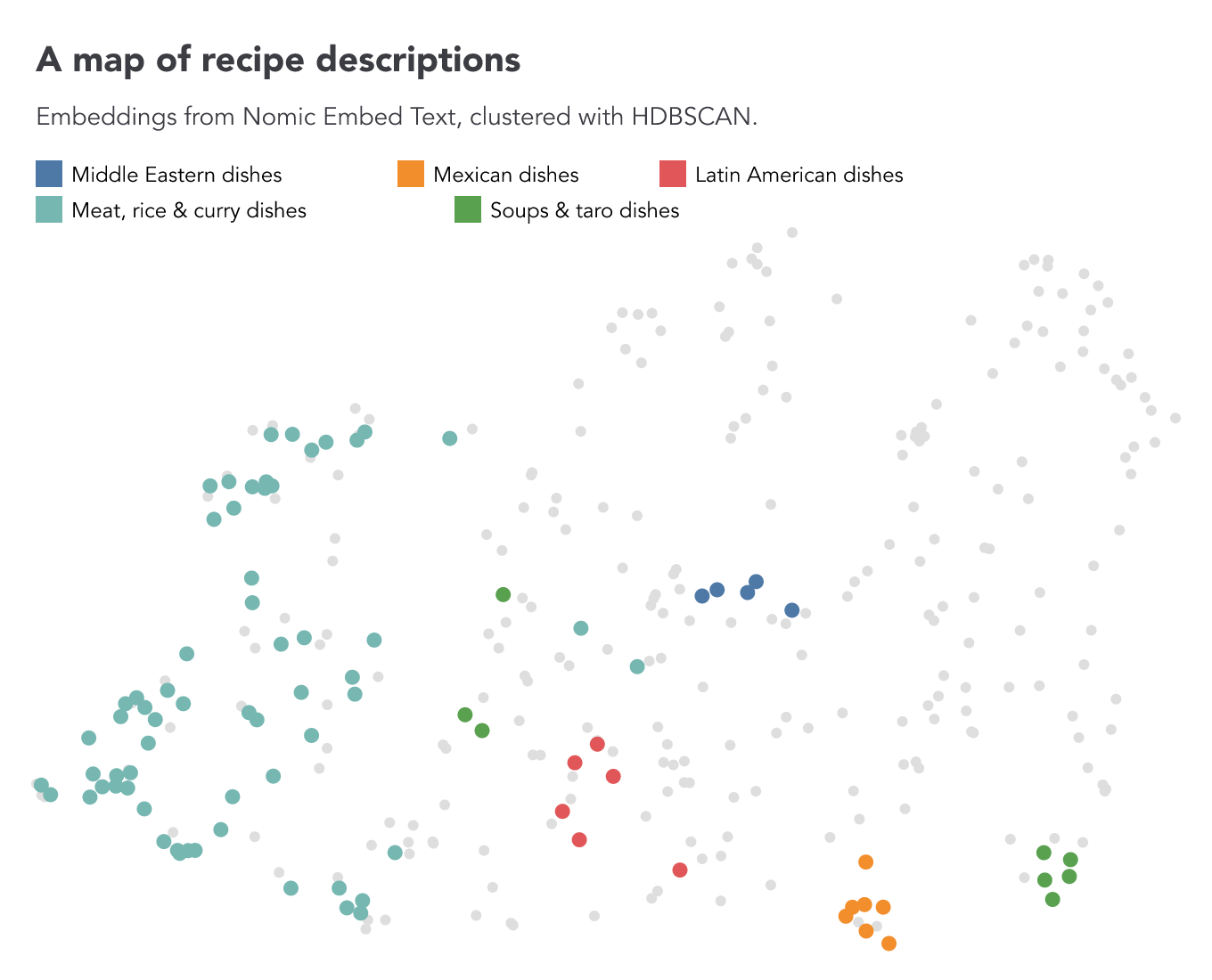
We can also use
umap
to project the embeddings into two dimensions and draw them with writeChart.
After inspecting the recipes in each cluster, we assign descriptive names to the
groups below. Nearby points suggest similar descriptions, but the projection
does not preserve every distance.
// Uses AI_EMBEDDINGS_PROVIDER, AI_EMBEDDINGS_MODEL, and any required credentials
// from .env.
import { SimpleDB } from "@nshiab/simple-data-analysis";
import { dot, plot } from "@observablehq/plot";
const sdb = new SimpleDB();
const recipes = sdb
.newTable("recipes")
.loadData(
"https://raw.githubusercontent.com/nshiab/simple-data-analysis/main/test/data/files/recipesClean.parquet",
)
.aiEmbeddings("Recipe", "embedding")
.hdbscan("embedding", "cluster", {
metric: "cosine",
minSamples: 3,
})
.replace("cluster", {
"cluster-0": "Middle Eastern dishes",
"cluster-1": "Mexican dishes",
"cluster-2": "Latin American dishes",
"cluster-3": "Meat, rice & curry dishes",
"cluster-4": "Soups & taro dishes",
})
.umap("embedding", { metric: "cosine" });
await recipes.writeChart(
(data) =>
plot({
title: "A map of recipe descriptions",
subtitle: "Embeddings from Nomic Embed Text, clustered with HDBSCAN.",
x: { axis: null },
y: { axis: null },
color: {
domain: [
"Middle Eastern dishes",
"Mexican dishes",
"Latin American dishes",
"Meat, rice & curry dishes",
"Soups & taro dishes",
],
scheme: "tableau10",
unknown: "#dedede",
legend: true,
},
marks: [
dot(data, {
x: "umapX",
y: "umapY",
fill: "cluster",
r: (d) => (d.cluster === "noise" ? 2 : 4),
sort: (d: { cluster: string }) => (d.cluster === "noise" ? 0 : 1),
}),
],
}),
"sda/output/recipes-umap.png",
);
await sdb.close();
Semantic search
Once we have embeddings, we can search by meaning rather than exact wording.
aiVectorSimilarity
embeds a search query using the same model and finds the closest recipe vectors.
Here, we ask for five recipes similar to "buttery pastry for breakfast".
// Uses AI_EMBEDDINGS_PROVIDER, AI_EMBEDDINGS_MODEL, and any required credentials
// from .env.
import { SimpleDB } from "@nshiab/simple-data-analysis";
const sdb = new SimpleDB();
const recipes = sdb.newTable("recipes");
// Compare the query embedding with each recipe embedding.
await recipes
.loadData(
"https://raw.githubusercontent.com/nshiab/simple-data-analysis/main/test/data/files/recipesClean.parquet",
)
.aiEmbeddings("Recipe", "embedding")
.aiVectorSimilarity("buttery pastry for breakfast", "embedding", 5, { similarityColumn: true })
.log();
await sdb.close();
Here are the five results with Nomic Embed Text. For readability, we show only the dish names and similarity scores, rounded to three decimals.
| Dish | … | similarity |
|---|---|---|
| Full English Breakfast | … | 0.652 |
| Pancakes | … | 0.650 |
| Bagel with Cream Cheese | … | 0.635 |
| Biscuits and Gravy | … | 0.632 |
| Kunafa | … | 0.629 |
Retrieval-augmented generation (RAG)
We can take retrieval one step further and use the matching recipes to help an
LLM answer a question.
aiRAG
first retrieves relevant rows with
hybridSearch,
which combines semantic matches from embeddings with
bm25
keyword matches. It then asks the LLM to answer using only those rows.
// Uses both AI provider/model pairs and any required credentials from .env.
import { SimpleDB } from "@nshiab/simple-data-analysis";
const sdb = new SimpleDB();
// We retrieve the most relevant recipes and ask the AI to answer
// based only on their contents.
const answer = await sdb
.newTable("recipes")
.loadData(
"https://raw.githubusercontent.com/nshiab/simple-data-analysis/main/test/data/files/recipesClean.parquet",
)
.aiRAG("I am vegan. What can I eat for lunch that is spicy?", "Dish", "Recipe", 10, {
verbose: true,
});
console.log(`${answer}\n`);
await sdb.close();
Here is the answer returned by gemma4:12b-mlx via Ollama, using Nomic Embed
Text for embeddings:
I found that you can eat Chakalaka for lunch. Chakalaka is a South African vegetable stew that is typically spicy and flavorful. It includes the following ingredients:
- Vegetable oil
- Onions
- Garlic
- Red chilies
- Bell peppers
- Carrots
- Turmeric
- Curry powder
- Cumin
- Coriander
- Diced tomatoes
- Baked beans (or kidney/butter beans)
- Vegetable broth or water
Natural language query
The
aiQuery
method turns a natural-language instruction into a SQL query and executes it on
the table.
// Uses AI_PROVIDER, AI_MODEL, and any required credentials from .env.
import { SimpleDB } from "@nshiab/simple-data-analysis";
const sdb = new SimpleDB();
const temperatures = sdb.newTable("temperatures");
await temperatures
.loadData(
"https://raw.githubusercontent.com/nshiab/simple-data-analysis/main/test/data/files/dailyTemperatures.csv",
)
.renameColumns({ t: "temperature", id: "station" })
.aiQuery("Compute the average temperature for each station with two decimals.", { verbose: true })
.log();
await sdb.close();
With gemma4:12b-mlx via Ollama, the model generates the following SQL query,
which SDA executes on the table:
CREATE OR REPLACE TABLE "temperatures" AS
SELECT
station,
ROUND(AVG(temperature), 2) AS average_temperature
FROM "temperatures"
GROUP BY station;
The resulting table is:
| station | average_temperature |
|---|---|
| 7024745 | 7.03 |
| 1108380 | 9.85 |
| 6158355 | 8.87 |
Analysing relationships
Similarity analysis
When you want to find items that resemble a specific one, calculating a similarity score can be very useful, especially when you have many attributes to compare.
Let's say we love Louis Jadot Bourgogne Pinot Noir and want to discover
similar wines. We can use
similarityMahalanobis,
as demonstrated below. Mahalanobis distance is useful because it can compare
features with different units and scales, while also accounting for correlations
between them.
The code loads the Vivino Burgundy dataset of 2,000 named wines, originally from Hugging Face. Many white wines have no recorded tannin value, so we replace missing tannin values with zero for this example. This is a simplifying assumption, not a measured value. We exclude 12 wines missing other characteristics. The code retrieves our favorite wine as the reference, then compares acidity, intensity, sweetness, and tannin to calculate a distance and similarity score for each wine. Finally, it logs the wines, with the closest matches first.
import { SimpleDB } from "@nshiab/simple-data-analysis";
const sdb = new SimpleDB();
const wines = sdb
.newTable("wines")
.loadData(
"https://raw.githubusercontent.com/nshiab/simple-data-analysis-core/main/test/data/files/wine.csv",
)
.replaceNulls("tannin", 0)
.removeMissing({ columns: ["acidity", "intensity", "sweetness"] });
// Retrieve our favorite wine's characteristics as an object.
const reference = await wines.getRow("fullName === 'Louis Jadot Bourgogne Pinot Noir'");
await wines
.similarityMahalanobis(["acidity", "intensity", "sweetness", "tannin"], reference, "distance", {
similarityColumn: true,
})
.sort({ similarity: "desc" })
.log();
await sdb.close();
For readability, we excluded the reference wine from the table below and show only the five closest matches, keeping their names, distances, and similarity scores rounded to three decimals. The code keeps all matching rows and columns, including the reference wine.
| fullName | distance | similarity |
|---|---|---|
| Maison Roche de Bellene Pinot Noir Bourgogne Vieilles Vignes | 0.094 | 0.982 |
| Moillard-Grivot Bourgogne Pinot Noir | 0.117 | 0.977 |
| Joseph Drouhin Laforet Bourgogne Pinot Noir | 0.119 | 0.977 |
| Louis Latour Bourgogne Pinot Noir | 0.151 | 0.971 |
| Albert Bichot Bourgogne Vieilles Vignes de Pinot Noir | 0.165 | 0.968 |
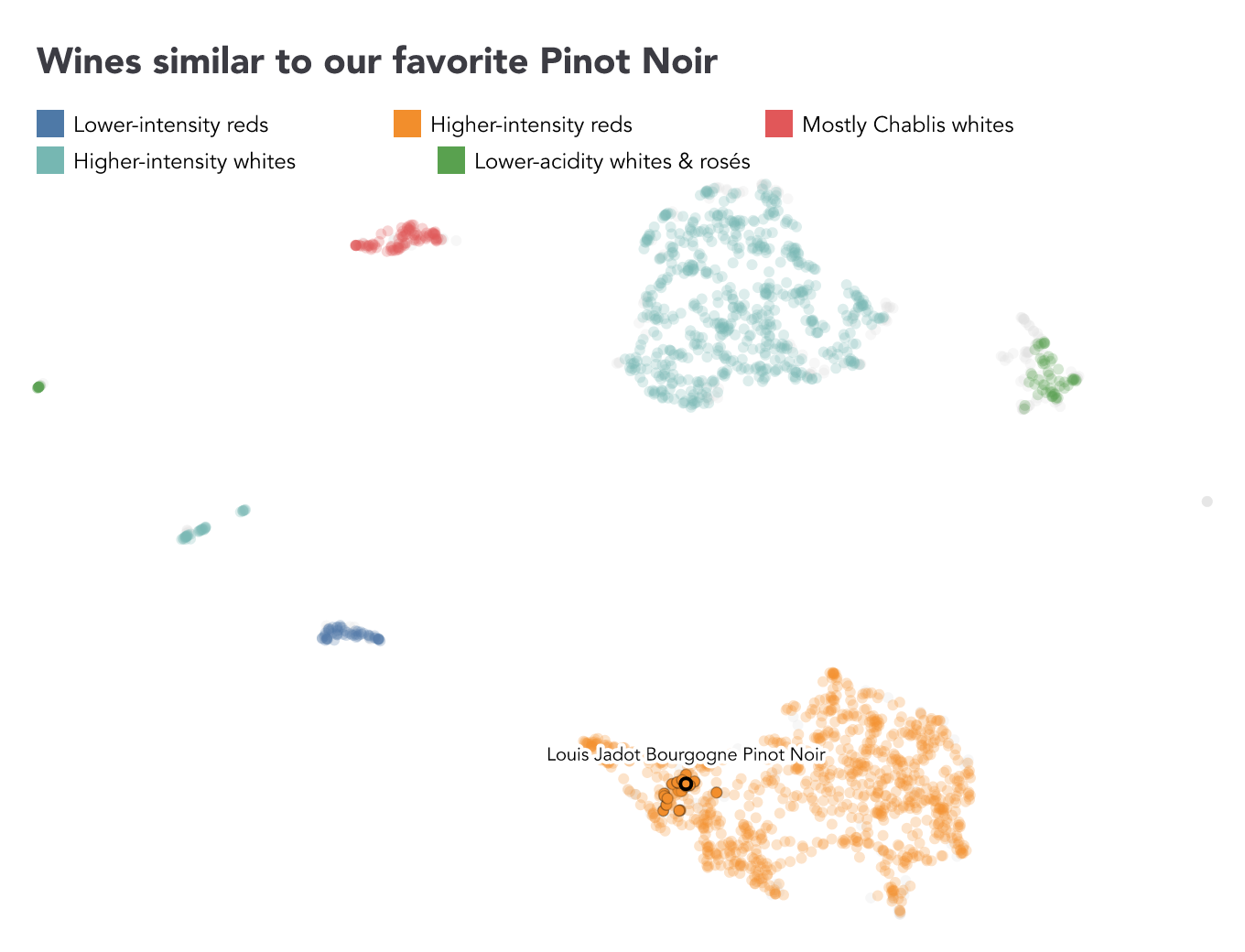
It's always useful to visualize our data, so let's update our code to create a chart.
In the code below, we use similarityMahalanobis to calculate similarity scores
and
hdbscan
to create clusters of wines with similar characteristics. We rename the
identified clusters, then use
umap
to reduce the four features to X and Y coordinates and writeChart to create
the scatter plot.
import { SimpleDB } from "@nshiab/simple-data-analysis";
import { dot, plot, text } from "@observablehq/plot";
const sdb = new SimpleDB();
const wines = sdb
.newTable("wines")
.loadData(
"https://raw.githubusercontent.com/nshiab/simple-data-analysis-core/main/test/data/files/wine.csv",
)
.replaceNulls("tannin", 0)
.removeMissing({ columns: ["acidity", "intensity", "sweetness"] });
const reference = await wines.getRow("fullName === 'Louis Jadot Bourgogne Pinot Noir'");
await wines
.similarityMahalanobis(["acidity", "intensity", "sweetness", "tannin"], reference, "distance", {
similarityColumn: true,
})
.hdbscan(["acidity", "intensity", "sweetness", "tannin"], "cluster", {
minClusterSize: 40,
minSamples: 10,
})
.replace("cluster", {
"cluster-0": "Lower-intensity reds",
"cluster-1": "Higher-intensity reds",
"cluster-2": "Mostly Chablis whites",
"cluster-3": "Higher-intensity whites",
"cluster-4": "Lower-acidity whites & rosés",
})
.umap(["acidity", "intensity", "sweetness", "tannin"])
.writeChart(
(data) =>
plot({
title: "Wines similar to our favorite Pinot Noir",
x: { axis: null },
y: { axis: null },
color: {
domain: [
"Lower-intensity reds",
"Higher-intensity reds",
"Mostly Chablis whites",
"Higher-intensity whites",
"Lower-acidity whites & rosés",
],
scheme: "tableau10",
unknown: "#dedede",
legend: true,
},
opacity: { domain: [0, 1], range: [0, 1] },
marks: [
dot(data, {
x: "umapX",
y: "umapY",
fill: "cluster",
fillOpacity: (d) => (d.similarity > 0.95 ? 1 : 0.25),
r: 3,
stroke: "black",
strokeWidth: (d) =>
d.fullName === reference.fullName ? 2 : d.similarity > 0.95 ? 0.75 : 0,
strokeOpacity: (d) => (d.fullName === reference.fullName ? 1 : 0.35),
sort: (d: { fullName: string; cluster: string }) =>
d.fullName === reference.fullName ? 2 : d.cluster === "noise" ? 0 : 1,
}),
text(data, {
filter: (d) => d.fullName === reference.fullName,
x: "umapX",
y: "umapY",
text: "fullName",
dy: -16,
fill: "black",
stroke: "white",
strokeWidth: 4,
}),
],
}),
"sda/output/wines-umap.png",
);
await sdb.close();
Clustering and UMAP reveal five groups of wines. Our reference wine is highlighted, with its closest matches appearing nearby.
Network analysis
Network analysis focuses on connections between items, such as transactions
between businesses, flights between airports, or friendships between people. SDA
has useful methods for exploring these relationships
(degree,
neighbors,
commonNeighbors,
reachable,
distances,
shortestPath,
paths,
findCycles,
topologicalSort,
and
connectedComponents).
For this example, we use a fictional flight schedule with 33 flights connecting 12 cities around the world. Each row is one flight, with a unique ID, origin, destination, departure and arrival times, and a price. Here are the first three rows:
| flightId | origin | destination | departure (UTC) | arrival (UTC) | price |
|---|---|---|---|---|---|
| F001 | Montreal | Toronto | 2030-01-15 08:00 | 2030-01-15 09:30 | 80 |
| F002 | Montreal | New York | 2030-01-15 09:00 | 2030-01-15 10:30 | 120 |
| F003 | Montreal | Vancouver | 2030-01-15 10:00 | 2030-01-15 15:30 | 180 |
Starting in Montreal, which cities can we reach, and how many flights would it
take? By default, distances counts the fewest connections to each city. This
works for any network: the connections could also be transactions, friendships,
or links between websites.
import { SimpleDB } from "@nshiab/simple-data-analysis";
const sdb = new SimpleDB();
await sdb
.newTable("flights")
.loadData(
"https://raw.githubusercontent.com/nshiab/simple-data-analysis-core/main/test/data/graphs/flights.csv",
)
.distances("origin", "destination", "Montreal")
.log();
await sdb.close();
Here are selected destinations. One step means a direct flight; two or more steps mean flights with connections.
| node | steps |
|---|---|
| Toronto | 1 |
| New York | 1 |
| London | 1 |
| Paris | 1 |
| Tokyo | 2 |
| Sydney | 2 |
However, with this flight dataset, we also need to account for takeoff and landing times and make sure we can catch connecting flights. SDA's graph analysis methods have convenient options to do this easily.
By rewriting our example with a few more options, we can account for all of
that. We allow at least an hour between flights with minGapMs. weight adds
up ticket prices, while elapsedTime also reports the time from the first
departure to the final arrival, including layovers. Setting minimize: "weight"
tells SDA to choose by price. If equally cheap routes have different step counts
or durations, distances returns each distinct summary.
import { SimpleDB } from "@nshiab/simple-data-analysis";
const sdb = new SimpleDB();
await sdb
.newTable("flights")
.loadData(
"https://raw.githubusercontent.com/nshiab/simple-data-analysis-core/main/test/data/graphs/flights.csv",
)
.distances("origin", "destination", "Montreal", {
startTimeColumn: "departure",
endTimeColumn: "arrival",
minGapMs: 60 * 60 * 1000,
elapsedTime: true,
weight: "price",
minimize: "weight",
})
.sort({ total: "asc" })
.log();
await sdb.close();
For readability, here are selected destinations. steps counts the flights in
the journey, and total is their combined ticket price. We display
elapsedTimeMs as hours below.
| node | steps | total | elapsed time (hours) |
|---|---|---|---|
| Toronto | 1 | 80 | 1.5 |
| New York | 1 | 120 | 1.5 |
| London | 2 | 350 | 10 |
| Paris | 3 | 430 | 12.25 |
| Tokyo | 2 | 700 | 17 |
| Sydney | 5 | 1020 | 38 |
You don't need all these options for every network. Without weights or time
options, routes are measured by their number of connections. With distances,
you can also set minimize: "steps" while still reporting price and elapsed
time. For transaction data, you might use reachable to follow connections or
degree to count payments received and sent. The methods handle traversing the
network for you.
External services
Google Cloud Storage
The
toBucket
method writes a table to a temporary file and uploads it to Google Cloud
Storage. The
loadBucket
method downloads and loads an object in chain order.
Set the project and bucket in .env. Authentication uses Google Application
Default Credentials. If ADC should load credentials from a specific JSON file,
also set GOOGLE_APPLICATION_CREDENTIALS to that file's path:
BUCKET_PROJECT=my-google-cloud-project
BUCKET_NAME=my-storage-bucket
# Optional: load credentials from a specific JSON file.
GOOGLE_APPLICATION_CREDENTIALS=./service-account.json
Load a table from one object, transform it, and upload the result as another object:
import { SimpleDB } from "@nshiab/simple-data-analysis";
const sdb = new SimpleDB();
const temperatures = await sdb
.newTable("temperatures")
.loadBucket("inputs/temperatures.parquet")
.filter("temperature > 30")
.log();
const uri = await temperatures.toBucket("outputs/hotTemperatures.parquet", { overwrite: true });
console.log(uri); // gs://my-storage-bucket/outputs/hotTemperatures.parquet
await sdb.close();
Google Sheets
The
toSheet
method sends a table directly to Google Sheets. Authenticate with a service
account by setting its email and private key in .env:
GOOGLE_SERVICE_ACCOUNT_EMAIL=service-account@example.iam.gserviceaccount.com
GOOGLE_PRIVATE_KEY="-----BEGIN PRIVATE KEY-----\n...\n-----END PRIVATE KEY-----\n"
Alternatively, point GOOGLE_APPLICATION_CREDENTIALS to the service-account
JSON file:
GOOGLE_APPLICATION_CREDENTIALS=./service-account.json
Share the spreadsheet with the service-account email before running the examples.
Load from a sheet
Use loadSheet() to load and transform data from a Google Sheet tab:
import { SimpleDB } from "@nshiab/simple-data-analysis";
const sdb = new SimpleDB();
await sdb
.newTable("temperatures")
.loadSheet("https://docs.google.com/spreadsheets/d/.../edit#gid=0")
.filter("temperature > 30")
.selectColumns(["station", "time", "temperature"])
.log();
await sdb.close();
Write to a sheet
Use toSheet() to write a table to a Google Sheet tab:
import { SimpleDB } from "@nshiab/simple-data-analysis";
const sdb = new SimpleDB();
const temperatures = sdb.newTable("temperatures");
await temperatures
.loadData(
"https://raw.githubusercontent.com/nshiab/simple-data-analysis/main/test/data/files/dailyTemperatures.csv",
)
.renameColumns({ t: "temperature", id: "station" })
.selectColumns(["station", "time", "temperature"])
.toSheet("https://docs.google.com/spreadsheets/d/.../edit#gid=0");
await sdb.close();
Datawrapper
The
toDatawrapper
method sends a table directly to a Datawrapper chart or table. Add your API key
to .env:
DATAWRAPPER_KEY=your-datawrapper-api-key
The chart ID is the short identifier in its Datawrapper URL. For maps, use
toGeoDatawrapper
with the same API key. The loadDatawrapper() and loadGeoDatawrapper()
methods also use it.
// Uses DATAWRAPPER_KEY from .env.
import { SimpleDB } from "@nshiab/simple-data-analysis";
const sdb = new SimpleDB();
const temperatures = sdb.newTable("temperatures");
await temperatures
.loadData(
"https://raw.githubusercontent.com/nshiab/simple-data-analysis/main/test/data/files/dailyTemperatures.csv",
)
.renameColumns({ t: "temperature", id: "station" })
.selectColumns(["station", "time", "temperature"])
.toDatawrapper("myChartId", { republish: true });
await sdb.close();
Caching fetched and computed data
Instead of running the same code over and over again, you can cache the results. This can speed up your workflow, especially when fetching data or performing computationally expensive operations.
When you use the
cache method,
the data is cached in a hidden .sda-cache folder. With cacheVerbose enabled,
the logs explain whether the callback, the table, and any additional inputs
match the cached entry. cache() passes the table to its callback and
automatically tracks changes made to that table before the cached step, as well
as changes to other SimpleTables used by the callback. Use inputs for other
values that should invalidate the cache, such as numbers or strings.
Here's an example caching fetched data and the result of a spatial join.
import { SimpleDB } from "@nshiab/simple-data-analysis";
const sdb = new SimpleDB({ cacheVerbose: true, logDuration: true });
// Cache the data until the callback or table changes.
const provinces = await sdb.newTable("provinces").cache((table) => {
table.loadGeoData(
"https://raw.githubusercontent.com/nshiab/simple-data-analysis/main/test/geodata/files/CanadianProvincesAndTerritories.json",
);
});
// Cache the data for 60 seconds or until the callback or table changes.
const fires = await sdb.newTable("fires").cache(
(table) => {
table
.loadData(
"https://raw.githubusercontent.com/nshiab/simple-data-analysis/main/test/geodata/files/firesCanada2023.csv",
)
.createPoints("lat", "lon", "geom");
},
{ ttl: 60 },
);
// Refresh this cache when the callback, the firesInsideProvinces table,
// or either table used by the callback changes.
const firesInsideProvinces = await sdb.newTable("firesInsideProvinces").cache((table) => {
table
.insertTables(fires)
.joinGeo(provinces, "inside")
.removeMissing()
.summarize({
columns: "hectares",
by: "nameEnglish",
stats: { nbFires: "count", burntArea: "sum" },
decimals: 0,
})
.sort({ burntArea: "desc" });
});
await firesInsideProvinces.log("all");
await firesInsideProvinces.logBarChart("nameEnglish", "burntArea");
await sdb.close();
After the first run, here's what you'll see in your terminal. For each
cache(), a file storing the results has been written in .sda-cache.
The whole script took around a second to complete.
cache() for provinces
Cache miss.
No matching cache entry exists for this computation.
Running computations and storing a new cache entry.
Computations done in 247 ms.
Wrote in cache in 1 ms.
cache() for fires
Cache miss.
No matching cache entry exists for this computation.
Running computations and storing a new cache entry.
Computations done in 350 ms.
Wrote in cache in 3 ms.
cache() for firesInsideProvinces
Cache miss.
No matching cache entry exists for this computation.
Running computations and storing a new cache entry.
Computations done in 68 ms.
Wrote in cache in 0 ms.
Table firesInsideProvinces:
┌───────────────────────────┬─────────┬───────────┐
│ nameEnglish │ nbFires │ burntArea │
├───────────────────────────┼─────────┼───────────┤
│ Quebec │ 706 │ 5024737 │
│ Northwest Territories │ 314 │ 4253907 │
│ Alberta │ 1208 │ 3214444 │
│ British Columbia │ 2496 │ 2856625 │
│ Saskatchewan │ 560 │ 1801903 │
│ Ontario │ 741 │ 441581 │
│ Yukon │ 227 │ 395461 │
│ Manitoba │ 301 │ 199200 │
│ Nova Scotia │ 208 │ 25017 │
│ Newfoundland and Labrador │ 85 │ 21833 │
│ Nunavut │ 1 │ 2700 │
│ New Brunswick │ 202 │ 854 │
└───────────────────────────┴─────────┴───────────┘
12 rows in total (count: 12)
Bar chart of "burntArea" per "nameEnglish":
┌
Quebec ┤████████████████████████████████████████ 5,024,737
│
Northwest Territories ┤██████████████████████████████████ 4,253,907
│
Alberta ┤██████████████████████████ 3,214,444
│
British Columbia ┤███████████████████████ 2,856,625
│
Saskatchewan ┤██████████████ 1,801,903
│
Ontario ┤████ 441,581
│
Yukon ┤███ 395,461
│
Manitoba ┤██ 199,200
│
Nova Scotia ┤ 25,017
│
Newfoundland and Labrador ┤ 21,833
│
Nunavut ┤ 2,700
│
New Brunswick ┤ 854
└
SimpleDB ran for 681 ms / 4 ms spent writing the cache
If you run the script less than 60 seconds after the first run, here's what you'll see.
Most computations are skipped and their cached data is loaded instead. In this example, the total runtime drops from 681 ms to 27 ms, making the second run around 25 times faster.
cache() for provinces
Cache hit.
Compute function unchanged.
Data loaded in 0 ms.
Running computations previously took 247 ms.
You saved 247 ms.
cache() for fires
Cache hit.
Compute function unchanged.
TTL of 1 min, 0 sec, 0 ms has not expired.
The creation date is May 28, 2026, at 4:37 p.m..
There are 54 sec, 941 ms left.
Data loaded in 21 ms.
Running computations previously took 312 ms.
You saved 291 ms.
cache() for firesInsideProvinces
Cache hit.
Compute function unchanged.
Table dependencies unchanged: "fires", "provinces".
Data loaded in 0 ms.
Running computations previously took 50 ms.
You saved 50 ms.
[Note to readers: I have cut the table and chart.]
SimpleDB ran for 27 ms / 588 ms saved by using the cache
After 60 seconds, the fires cache expires while the provinces cache is reused.
Because firesInsideProvinces uses both tables in its callback, its cache
refreshes automatically when the fires table changes.
cache() for provinces
Cache hit.
Compute function unchanged.
Data loaded in 1 ms.
Running computations previously took 247 ms.
You saved 246 ms.
cache() for fires
Cache entry is stale.
Compute function unchanged.
TTL of 1 min, 0 sec, 0 ms has expired.
The creation date is May 28, 2026, at 4:37 p.m..
It was created 1 min, 17 sec, 465 ms ago.
Running computations and refreshing the cache entry.
Computations done in 340 ms.
Wrote in cache in 3 ms.
cache() for firesInsideProvinces
Cache miss.
Compute function unchanged.
Table dependencies changed: "fires".
Table dependencies unchanged: "provinces".
Running computations and storing a new cache entry.
Computations done in 48 ms.
Wrote in cache in 1 ms.
[Note to readers: I have cut the table and chart.]
SimpleDB ran for 399 ms / 246 ms saved by using the cache / 4 ms spent writing the cache